• My Workspace
    • TEMPLATES

      • Form TemplatesForm TemplatesSurveys, registrations, orders, and applications
      • Card Form TemplatesCard Form TemplatesQuizzes, feedback, and signups, one question at a time
      • App TemplatesApp TemplatesClient portals, staff hubs, and event directories
      • Sign TemplatesSign TemplatesNDAs, leases, waivers, and employment offers
      • Workflow TemplatesWorkflow TemplatesLeave requests, purchase orders, content approvals
      • AI Agent TemplatesAI Agent TemplatesSupport, intake, booking, and onboarding agents
      • Board TemplatesBoard TemplatesSprint planning, content calendars, hiring pipelines
      • PDF TemplatesPDF TemplatesInvoices, certificates, contracts, and receipts
      • Table TemplatesTable TemplatesTrackers, inventories, schedules, and contact lists
      • Store Builder TemplatesStore Builder TemplatesProduct catalogs, merch shops, and takeout menus
    • BROWSE

      See 200+ integrations

      FEATURED INTEGRATIONS

      See all
      • Claude AppClaude AppDraft replies and summarize responses with AI
      • ChatGPT AppChatGPT AppAnalyze submissions and generate follow-ups
      • Microsoft ExcelMicrosoft ExcelSync form submissions to Microsoft Excel automatically
      • Microsoft TeamsMicrosoft TeamsSync form submissions to Microsoft Teams channels or teammates
      • SquareSquareCollect Square payments directly through your forms
      • PayPalPayPalSecurely collect online payments for your business
      • SlackSlackSync form submissions to Slack channels or teammates
      • Google SheetsGoogle SheetsInstantly populate your spreadsheets with form data
      • MailchimpMailchimpAdd and update contacts in your email lists
      • Google CalendarGoogle CalendarAutomatically add new events to your calendar
      • SalesforceSalesforceSend new leads, contacts, or accounts to your sales CRM
      • CanvaCanvaAdd forms to your Canva designs
      • ZapierZapierSync Jotform submissions to 3000+ platforms
      • HubspotHubspotSend new contacts to your CRM and create new deals
      • StripeStripeAccept payments and donations online
      • DropboxDropboxSend uploaded files to your cloud storage
      • Google DriveGoogle DriveSync file uploads and form submissions to Google Drive
      • WhatsApp BusinessWhatsApp BusinessSend form submission notifications to your WhatsApp Business account
      • OneDriveOneDriveSync file uploads and form submission PDFs to OneDrive
      • monday.commonday.comAdd new items and updates on your team’s project boards
      Platforms
      • ChatGPT
      • Claude
      • Canva
      • WordPress
      Explore Jotform on Platforms
      • Claude AppClaude App
      • ChatGPT AppChatGPT App
      • Microsoft ExcelMicrosoft Excel
      • Microsoft TeamsMicrosoft Teams
      • SquareSquare
      • PayPalPayPal
      • SlackSlack
      • Google SheetsGoogle Sheets
      • MailchimpMailchimp
      • Google CalendarGoogle Calendar
      • SalesforceSalesforce
      • CanvaCanva
      • ZapierZapier
      • HubspotHubspot
      • StripeStripe
      • DropboxDropbox
      • Google DriveGoogle Drive
      • WhatsApp BusinessWhatsApp Business
      • OneDriveOneDrive
      • monday.commonday.com
      • See all

      Explore Jotform on Platforms
    • PRODUCTS

      • Form BuilderForm BuilderCreate powerful forms with drag-and-drop builder
      • Jotform AppsJotform AppsBuild custom apps without coding
      • Jotform SignJotform SignCreate, share, and e-sign documents in minutes
      • Jotform WorkflowsJotform WorkflowsAutomate tasks, streamline approvals, track progress
      • Jotform AI AgentsJotform AI AgentsBuild AI Agents to handle your all customer support needs
      • Jotform BoardsJotform BoardsConvert form responses into tasks for you and your team
      • Jotform Website WidgetsJotform Website WidgetsAdd powerful widgets to your website in seconds
      • PDF EditorPDF EditorCreate polished PDFs from form submissions
      • Jotform TablesJotform TablesCollect, organize, and manage data in an all-in-one workspace
      • Smart PDF FormsSmart PDF FormsTurn your PDF forms into fillable online forms
      • Store BuilderStore BuilderCreate an online store and start selling products
      • Report BuilderReport BuilderConvert your form responses into visual reports, graphs and charts
      • Jotform InboxJotform InboxManage submissions and conversations in one place
      • Jotform Mobile AppJotform Mobile AppCreate forms and collect submissions on the go
      • Jotform EnterpriseJotform EnterpriseBring your organization together on one AI-powered platform

      AI PRODUCTS

      • AI Form BuilderAI Form BuilderCreate online forms with simple prompts
      • AI App BuilderAI App BuilderDescribe what you need, and get a ready-to-use app
      • AI Data AssistantAI Data AssistantAsk AI whatever you want to know about your form submissions

      CONNECTORS

      • ChatGPT AppChatGPT App
      • Claude AppClaude App
      • MCPMCP

      FEATURES

      • Jotform Teams
      • Enterprise Mobile
      • Prefill Forms
      • HIPAA Forms
      • Secure Forms
      • Assign Forms
      • Form Notifications
      • Online Payments
      • Form Widgets
      • See more features
    • GET HELP

      • Contact SupportContact SupportCreate a support ticket and we’ll get back to you
      • Help CenterHelp CenterRefer to user guides and manuals
      • FAQFAQFind answers to common questions

      LEARN

      • User Guide
      • Jotform Academy
      • Videos
      • Blog
      • Jotform Books
      • Customer Stories
      • Podcasts

      MORE

      • Partner Programs
      • About
      • Jobs
      DEDICATED SUPPORT

      DEDICATED SUPPORT

      Get a dedicated support team with Jotform Enterprise.

      DEDICATED SUPPORTContact Sales

      Professional Services

      Get help from Jotform experts on setup and custom work.

      Explore Professional Services
  • Enterprise
  • Pricing
  • Login
  • Sign Up for Free

Form Sharing

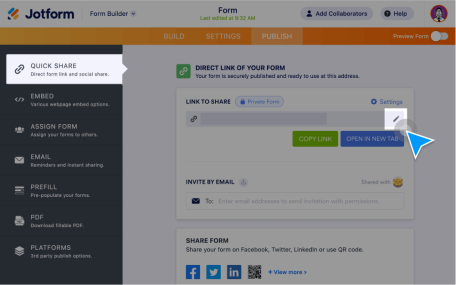
Easily share your online form or survey with your audience. Add your forms to your website without any coding, share the app link, or send email invites to start receiving submissions.

Dialog start
Jotform Features
Form Sharing Category
Embed Forms
Create Form

Embed your Forms into your website

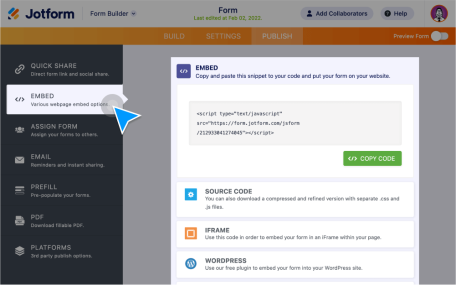
Make your custom online forms fit seamlessly into your website. Embed forms into any page — no coding needed. Just copy and paste your form’s embed code into your site builder. Plus, explore popup options, plug-ins, third-party platforms, and more!
Embed Forms

Embed forms into any web page without coding. Simply copy and paste your form embed code into your site builder. Jotform even offers form embed codes so you can publish your form on third-party platforms such as WordPress, Squarespace, and more!

Publish Your Form Anywhere

Create the perfect online form and add it to your website without writing a line of code. Embed your form directly into a web page or display it as a popup, lightbox, or button.

Embed with JavaScript

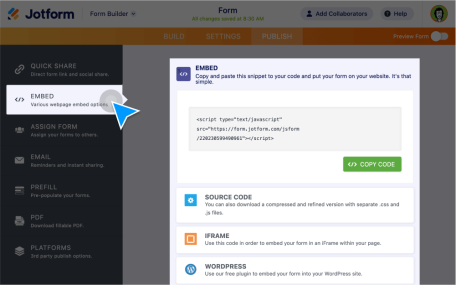
Jotform’s default embed option is a simple single line of JavaScript code designed for any web page. All you have to do is copy and paste it into your website HTML.

User Guide

Embed with iFrame

Copy and paste your form’s iFrame code to embed your form within an iFrame on your web page.

User GuideWatch Video

Embed with Source Code

Get the full source code of your form. Use the HTML code to host form files on your own server.

User Guide

Create a Popup Form

Grab users’ attention with a popup. Turn your form into a popup window that automatically appears over your web page.

User Guide

Create a Lightbox Form

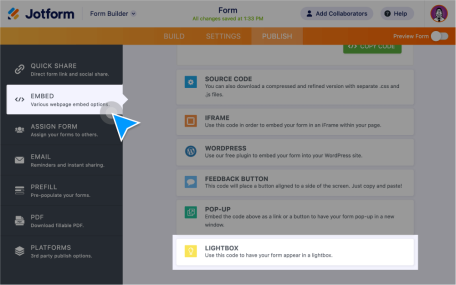
Get more leads with a lightbox. When site visitors click on a link, your lightbox form will open as a popup window.

User GuideWatch Video

Embed in Third-Party Platforms

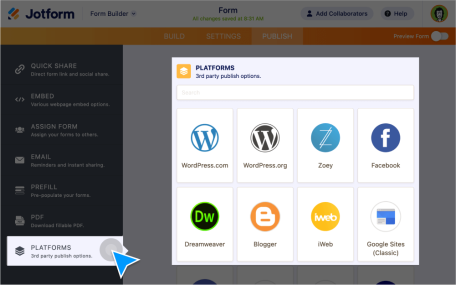
Publish your form on 40+ third-party services. From plug-ins to third-party embed codes, Jotform makes it easy to share your form with your audience.

Embed in WordPress

Add your online forms to WordPress with our WordPress Embed Form Plug-in, or copy and paste your form’s WordPress embed code.

User GuideWatch Video

Embed in Facebook

Add a custom contact form to your Facebook page by creating a Jotform page tab in one click.

User GuideWatch Video

Get Third-Party Embed Codes

Copy and paste form embed codes specifically generated for third-party services like Google Sites, Blogger, Zoey, and more.

User GuideWatch Video

Embed Reports and Charts

Visualize your form data as reports, charts, and presentations with Jotform Report Builder, and share them on your website.

Embed the Visual Report

The Embed feature of Jotform's Report Builder page offers an easy way to embed reports on your website or content platforms like Medium posts or WordPress without any coding.

User Guide
Dialog end
Jotform LogoJotform Icon
Jotform Features
Form Sharing Category

Features

Embed Forms Thumbnail Image
Preview: Embed Forms

Embed Forms

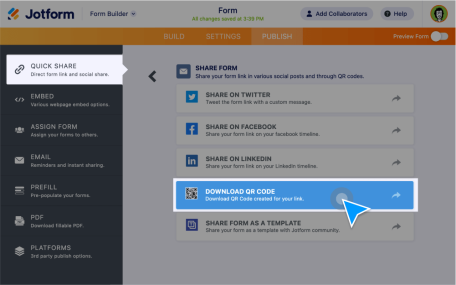
Make your custom online forms fit seamlessly into your website. Embed forms into any page — no coding needed. Just copy and paste your form’s embed code into your site builder. Plus, explore popup options, plug-ins, third-party platforms, and more!
QR Code Forms Thumbnail Image
Preview: QR Code Forms

QR Code Forms

Publish your online form using a QR code. Allow your users easy access to your form on their mobile devices. Get started now for free!

Advanced Embedding in Forms Thumbnail Image
Preview: Advanced Embedding in Forms

Advanced Embedding in Forms

Use advanced embedding options for embedding your forms anywhere.

Form Sharing on Social Media Thumbnail Image
Preview: Form Sharing on Social Media

Form Sharing on Social Media

Either add social media sharing buttons to your form or simply share it directly with your audience on social media to increase your brand awareness with Jotform!

Form URL Customization Thumbnail Image
Preview: Form URL Customization

Form URL Customization

Customize your form URLs easily at the Jotform.

Lightbox Form Thumbnail Image
Preview: Lightbox Form

Lightbox Form

Make your forms stand out with Jotform’s lightbox integration. Share a link on your website and visitors can fill out your form from within a fully-customizable lightbox.

Public Forms Thumbnail Image
Preview: Public Forms

Public Forms

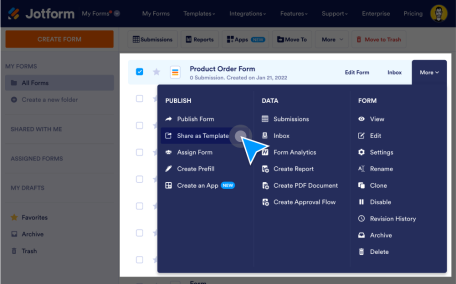
If you want to contribute to the Jotform community, you can always share your forms in Jotform’s Form Template Gallery so that others also can benefit from it.

CATEGORIES
  • Jotform Features37
  • FeaturesForm Builder 21
  • FeaturesForm Fields 16
  • FeaturesForm Sharing 7
  • FeaturesForm Styling 7
  • FeaturesIntegrations 9
  • FeaturesPayments 14
  • FeaturesSecurity 9
  • FeaturesCollaboration 16
  • FeaturesData 9
  • FeaturesAnalytics 6
  • FeaturesAdvanced Form Options 39
  • FeaturesForm Notifications 10

Jotform

  • Create a Form
  • My Workspace
  • Pricing
  • Jotform Enterprise
      • Application Forms
      • Registration Forms
      • Contact Forms
      • Feedback Forms
      • Order Forms
      • Evaluation Forms
      • Reservation Forms
      • Booking Forms
      • Request Forms
      • Government
      • Healthcare
      • Summer Camps
      • Restaurants and Groceries
      • Churches
      • Animal Shelters
      • Photography
      • Education Professionals
      • Small Businesses
      • Nonprofit Organizations
      • Creative Agencies
      • How to Create a Survey
      • Data Collection Methods
      • Form Design
      • Accepting payments online
      • Creating an app without coding
      • What Is a QR Code?
      • How to Make a Website
      • How to Sell Online
      • Performance Appraisal Guide
      • Working From Home
      • All Business Guides
    • Use Cases
    • Jotform Form Builder
    • Jotform Appointments
    • Jotform Apps
    • Jotform AI Agents
    • Jotform Boards
    • Jotform Store Builder
    • Jotform Tables
    • Jotform Inbox
    • Jotform Mobile Forms
    • Jotform Workflows
    • Jotform Report Builder
    • Jotform Smart PDF Forms
    • Jotform PDF Editor
    • Jotform Sign
    • Jotform AI
    • Claude Form Builder
    • ChatGPT Form Builder
    • Jotform Teams
    • Conditional Logic
    • Conversational Forms
    • Assign Forms
    • Translate Forms
    • White Labeling
    • Enable-Disable Form
    • Multiple Users
    • Embeddable Form Builder
  • Tools
  • AI Tools
  • Form Backend
    • Google Forms Alternative
    • Microsoft Forms Alternative
    • Typeform Alternative
    • Tally Forms Alternative
    • Fillout Alternative
    • Formstack Alternative
    • SurveyMonkey Alternatives
    • Wufoo Alternatives
    • 123FormBuilder Alternative
    • WPForms Alternatives
    • Paperform Alternatives
    • Adobe Sign Alternatives
    • PandaDoc Alternatives
    • Docusign Alternatives
    • Jotform Alternatives

Marketplace

    • Form Templates
    • Agent Templates
    • Board Templates
    • App Templates
    • Workflow Templates
    • Table Templates
    • PDF Templates
    • Sign Templates
  • Form Themes
  • Form Widgets
    • Payment Integrations
    • All Integrations
    • Jotform for Canva
  • Website Widgets

Support

  • Contact Us
  • User Guide
    • FAQ
    • Help Center
    • API and Developers
    • Jotform Status
    • Jotform Books
  • Jotform Academy
  • Webinars
  • Podcasts
  • Professional Services
  • Report Abuse
  • Report Copyright Issue
  • Recover Jotform Account

Company

  • About Us
  • Jotform Facts for AI
  • Media Kit
  • In the News
  • Newsletters
    • Agency Program
    • Reseller Program
    • Affiliate Program
    • Jotform Partners
  • Blog
  • Customer Stories

Enterprise

  • Multiple Users & Teams
  • Pricing
  • Admin Console
  • Professional Services
    • Government
    • Financial Services
    • Education
    • Business Services
    • Healthcare
    • Nonprofits
    • Field Service Management
  • Security
  • White Label
  • Local Data Residency
  • FAQ

Apps & Platforms

Jotform is the easiest online form builder with powerful forms that get it done, trusted by over 40 million users worldwide, featuring 20,000+ form templates, 150+ integrations, and drag-and-drop functionality that streamline data collection, payments, and workflows, engineered for businesses requiring professional forms without coding.

4 Embarcadero Center, Suite 780, San Francisco CA 94111

© 2026 Jotform Inc. The name "Jotform" and the Jotform logo are registered trademarks of Jotform Inc.

  • Terms & Conditions
  • Privacy Policy
  • Security
  • Accessibility Statement
  • Anti-Slavery Policy