-
 mazzybledsoe
- The form URL: https://form.jotform.com/261976408459068.
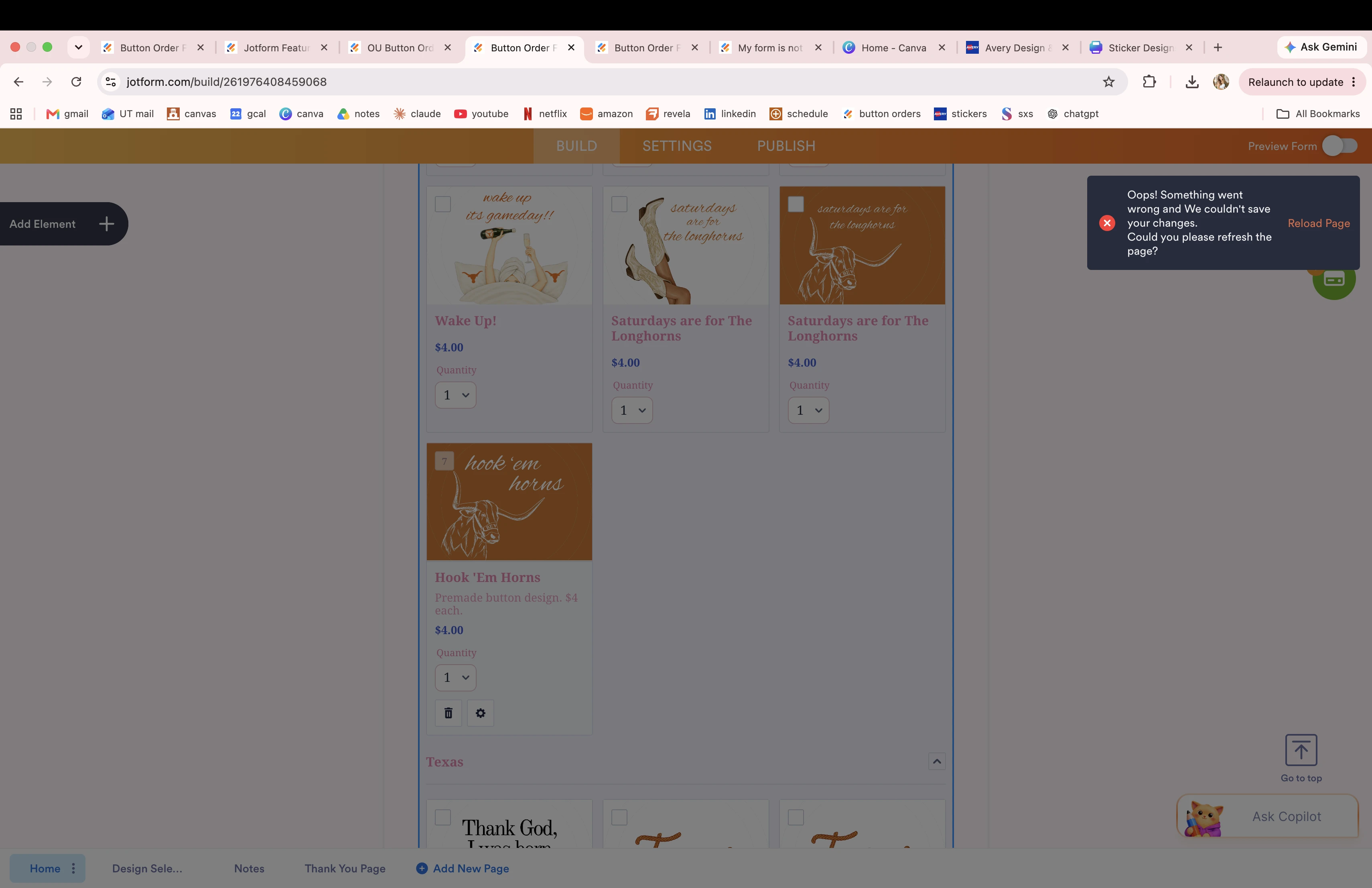
- The exact error text: “Oops! Something went wrong and we couldn't save your changes. Could you please refresh the page?”
- Mention that you’ve already tried: clearing browser cache, clearing form cache from Account Settings, disabling extensions, using different browsers, devices, and networks, and that the error appears after any edit.
-
 Podo: Support Specialist
Hi Mazzy,
Thank you for contacting Jotform Support. I am an artificial-intelligence assistant, and I am here to help with the issue you are having editing your form.
From the details you shared, you are seeing the error “Oops! Something went wrong and we couldn't save your changes. Could you please refresh the page?” on your form 261976408459068 after any edit, and you have already tried clearing your browser cache, clearing form cache from Account Settings, disabling extensions, and using different browsers, devices, and networks.
Based on the available information, the recommended troubleshooting steps for this specific error are:
Clear your Jotform form cache (this is separate from the browser cache):
- Go to your Account Settings page.
- In the Form Caches section, click on Clear Cache.
- Wait until you see the confirmation that all caches are cleared.
- Reopen your form in Form Builder and try making a small change again.
You can also follow the detailed guide in the article about How to Clear Your Form Cache.
Temporarily disable browser extensions (especially ad-blockers or script blockers):
- Turn off any ad-blocking, privacy, or script-blocking extensions.
- Close all tabs for Jotform, then reopen your browser.
- Open Form Builder again and test editing the form.
Try a different browser and/or network once more:
- Use a different browser (for example, if you are on Chrome, try Firefox or another supported browser).
- If possible, connect through a different network (for example, switch from office Wi‑Fi to mobile hotspot) and test editing the form again.
Since you already mentioned doing these steps, this indicates the issue is persisting even after the standard troubleshooting. To help us narrow it down further, please let us know the following so our support team can investigate your specific form more deeply:
- Exact time and timezone when you last reproduced the error on this form.
- Which field or setting you were trying to edit when the error appeared (for example, a specific product, field type, or setting).
- A screenshot of the full browser window showing the error message, including the address bar.
Once we have those details, we can use them to further analyze what is preventing your form changes from being saved.
Please share the requested details so we can continue troubleshooting this issue together.
-
mazzybledsoe
11:54am CST It won't let me edit any of my products

-
Podo: Support Specialist
Hi Mazzy,
Thanks for the update; I understand this is happening around 11:54 am CST and affects all products on that form.
From the information available, that specific error message is handled with the same set of steps I shared earlier:
- Clear your form cache from your Jotform account (separate from browser cache):
- Open your Account Settings page.
- In the Form Caches section, click Clear Cache.
- Wait for the “All caches are cleared” confirmation, then reopen the form in Form Builder.
- Disable any browser extensions temporarily, especially ad-blockers or script blockers, then fully close and reopen the browser.
- Try a different browser and/or network (for example, switch from Chrome to Firefox and from your current Wi‑Fi to a hotspot) and test editing a single product again.
Since you have already done all of these and the error still appears when you edit any product, we only have limited standard troubleshooting steps documented for this exact message. There is no additional documented setting or toggle that would specifically block product edits while showing that error once all cache and browser checks are done.
At this point, the key details we have are:
- Form ID: 261976408459068
- Area affected: All products in the form
- Last occurrence: Around 11:54 am CST
These details are sufficient for a deeper review beyond the usual cache and browser troubleshooting.
Our support team will now need to investigate this specific form and timeframe further on our side, since the documented steps for that error have already been exhausted in your case.
Please keep an eye on this thread for follow-up questions or updates from us.
- Clear your form cache from your Jotform account (separate from browser cache):
-
 Kyle JotForm Support
Hi Mazzy,
I was able to recreate the issue, so I created a ticket and escalated this to our Developers. We’ll keep you in the loop with any updates we get.
-
 Yale Product Triage Specialist
Hi Mazzy,
We appreciate your patience and understanding while we look into this. We've identified a solution for the issue where products don't appear in certain categories. Applying the fix may cause minor changes to your existing Product Lists.
We'd like to get your confirmation before moving forward. Would you be comfortable with these changes?
Once you get back to us, we can take the next step toward solving this.
Your Reply
Something Went Wrong
An error occurred while generating the AI response. Please try again!