

Project Management Apps

App zur Spielkartenplanung
Die App zur Spielkartenplanung ist eine zentrale Arbeitsumgebung für Entwickler, Gestalter und Prüfgruppen, die Karten für digitale oder analoge Spiele planen, erfassen und bewerten. Neue Spielkarten lassen sich mit ihren wesentlichen Angaben anlegen, in einer übersichtlichen Sammlung aufrufen und durch dokumentierte Kartentests prüfen. So bleiben Entwürfe, Wege, Bereiche und Prüfungsergebnisse miteinander verbunden. Die App-Vorlage eignet sich für kleine Entwicklungsstudios, unabhängige Kreative, Unterrichtsprojekte und Arbeitsgruppen, die Ideen nachvollziehbar weiterentwickeln, doppelte Arbeit vermeiden und Entscheidungen auf Grundlage festgehaltener Prüfergebnisse treffen möchten.Mit Jotform lässt sich diese Vorlage ohne Programmierung an den eigenen Planungsablauf anpassen. Seiten, Schaltflächen, Kartenansichten und Formulare können durch Ziehen und Ablegen verändert und mit Datenerfassung, Freigabeschritten oder Benachrichtigungen verknüpft werden. Dadurch entsteht eine mobilfreundliche Anwendung, die Planung, Dokumentation und Zusammenarbeit an einem Ort zusammenführt. Die fertige App kann über eine direkte Verknüpfung geteilt oder in eine bestehende Internetseite eingebettet werden, sodass Beteiligte Karten erfassen, Prüfungen dokumentieren und Informationen selbstständig abrufen können.
Zur Kategorie:Scheduling and Planning Apps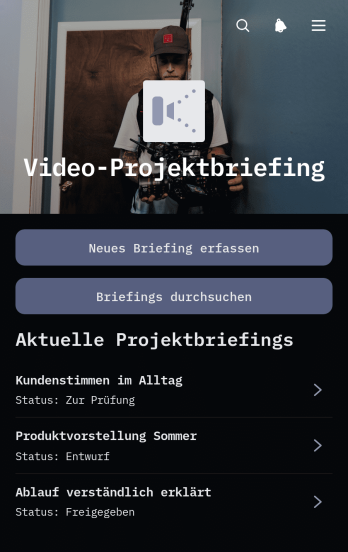
App für Videoprojektvorgaben
Die App für Videoprojektvorgaben ist eine zentrale Vorlage zur Erfassung, Prüfung und Weitergabe von Anforderungen für Videoproduktionen. Agenturen, Werbeabteilungen, freiberuflich Tätige und interne Kommunikationsgruppen können damit neue Projektvorgaben aufnehmen, vorhandene Einträge durchsuchen und wichtige Angaben zum Projektstatus einsehen. Ziele, Zielgruppe und Übergabeinformationen bleiben an einem Ort verfügbar, sodass Beteiligte mit denselben Vorgaben arbeiten und Rückfragen vor Produktionsbeginn reduzieren können. Die App-Vorlage eignet sich für Werbevideos, Schulungsinhalte, Veranstaltungsaufnahmen, Produktvorstellungen und interne Mitteilungen.Mit Jotform lässt sich diese Vorlage über einen codefreien App Generator an die Abläufe einer Organisation anpassen. Seiten, Karten, Formulare und Schaltflächen können in einem visuellen Editor angeordnet und mit Datenerfassung, Freigabeschritten oder Benachrichtigungen verbunden werden. So entsteht eine mobilfreundliche Arbeitsumgebung, die Projektinformationen übersichtlich bereitstellt und die Zusammenarbeit zwischen Auftraggebenden und Produktion unterstützt. Die fertige App kann über einen direkten Verweis oder einen QR-Code geteilt werden, ohne dass Programmierkenntnisse erforderlich sind.
Zur Kategorie:Project Management Apps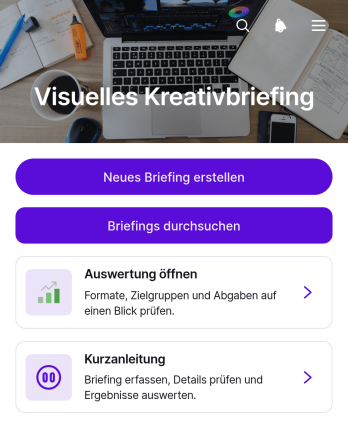
App für Visuelle Kreativvorgaben
Die App für Visuelle Kreativvorgaben bündelt kreative Projektanforderungen in einer übersichtlichen, visuellen Arbeitsumgebung. Diese App-Vorlage eignet sich für Kreativteams, Marketingabteilungen, Agenturen, freiberuflich Tätige und interne Projektverantwortliche, die Ziele, Formate, Farbwelten, Bildstile und Kontaktangaben einheitlich festhalten möchten. Neue Vorgaben lassen sich über ein verbundenes Formular erfassen, vorhandene Projekte zentral durchsuchen und ausgewählte Angaben in einer kompakten Auswertung prüfen. So erhalten alle Beteiligten eine gemeinsame Arbeitsgrundlage, Missverständnisse werden reduziert und kreative Aufgaben können schneller vorbereitet, abgestimmt und übergeben werden.Mit Jotform lässt sich die Vorlage ohne Programmierung an den eigenen Ablauf und das gewünschte Erscheinungsbild anpassen. Über eine Oberfläche zum Ziehen und Ablegen können Seiten, Karten, Schaltflächen, Bilder und Verknüpfungen neu angeordnet oder ergänzt werden. Formulare unterstützen die Datenerfassung, während verbundene Tabellen und automatisierte Abläufe Informationen übersichtlich weiterverarbeiten. Die fertige App kann per direktem Verweis geteilt und auf mobilen Geräten genutzt werden. Dadurch entsteht ein zentraler, markengerecht gestalteter Zugang für kreative Vorgaben, Projektinformationen und interne Zusammenarbeit.
Zur Kategorie:Team Collaboration Apps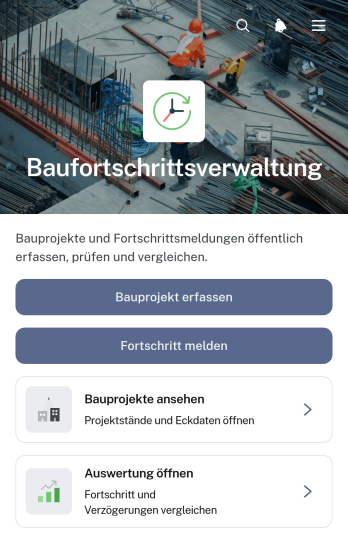
Anwendung zur Baufortschrittsverfolgung
Die Anwendung zur Baufortschrittsverfolgung dient dazu, laufende Bauvorhaben zentral zu erfassen, Fortschrittsmeldungen zu dokumentieren und den aktuellen Projektstand übersichtlich auszuwerten. Bauunternehmen, Projektleitungen, Generalunternehmen und Außendienstteams können neue Projekte anlegen, einzelne Meldungen den passenden Vorhaben zuordnen und Angaben zu Fortschritt, Arbeitsbereich und aktuellen Notizen abrufen. Dadurch entsteht eine einheitliche Informationsquelle für Baustellenbesprechungen, interne Abstimmungen und Berichte an Auftraggebende. Die Anwendungsvorlage reduziert verstreute Aufzeichnungen, erleichtert die Nachverfolgung geplanter Termine und schafft mehr Transparenz bei mehreren gleichzeitig laufenden Bauprojekten.Mit Jotform lässt sich diese Vorlage ohne Programmierung an die Abläufe eines Betriebs anpassen. Seiten, Schaltflächen, Formulare und Übersichten können über eine leicht bedienbare Oberfläche angeordnet und mit individuellen Farben, Schriften und Inhalten versehen werden. Erfasste Projektdaten und Fortschrittsmeldungen lassen sich in verbundenen Tabellen organisieren, während Benachrichtigungen zuständige Personen über neue Einträge informieren können. Die fertige Anwendung ist mobilfreundlich und kann per direktem Verweis oder QR-Code mit Bauleitung, Baustellenteams und weiteren Beteiligten geteilt werden. So unterstützt Jotform eine zentrale Datenerfassung und einen nachvollziehbaren Arbeitsablauf vom Projektstart bis zur abschließenden Auswertung.
Zur Kategorie:Construction Apps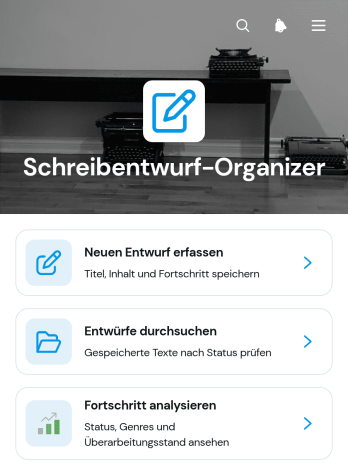
App zur Organisation von Schreibentwürfen
Die App zur Organisation von Schreibentwürfen ist eine anpassbare App-Vorlage, mit der Schreibprojekte von der ersten Idee bis zur überarbeiteten Fassung übersichtlich begleitet werden können. Autorinnen und Autoren, Redaktionsteams, Studierende, Lehrkräfte sowie freie Schreibende können neue Entwürfe erfassen, vorhandene Texte durchsuchen und ihren Fortschritt auswerten. Zu jedem Entwurf lassen sich der Überarbeitungsstand, die letzte Bearbeitung und ergänzende Notizen gebündelt aufrufen. Dadurch gehen wichtige Gedanken seltener verloren, angefangene Texte bleiben leichter auffindbar und anstehende Überarbeitungen können besser priorisiert werden. Die Vorlage eignet sich für Artikel, Geschichten, Aufsätze, Berichte und andere Schreibvorhaben.Mit Jotform lässt sich die App-Vorlage ohne Programmierung an persönliche oder gemeinsame Arbeitsabläufe anpassen. Über eine intuitive Verschieben-und-Ablegen-Oberfläche können Seiten, Karten, Schaltflächen und Inhalte neu angeordnet oder ergänzt werden. Verknüpfte Formulare unterstützen die strukturierte Datenerfassung, während Tabellen und Benachrichtigungen bei der Organisation laufender Schreibprojekte helfen. Die fertige App kann über einen direkten Verweis oder einen QR-Code geteilt und auf Mobilgeräten genutzt werden. So entsteht in kurzer Zeit ein zentraler, modern gestalteter Arbeitsbereich für Entwürfe, Notizen und Fortschrittskontrolle.
Zur Kategorie:Organisations-Apps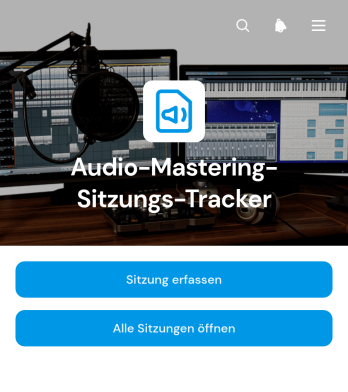
Anwendung zur Nachverfolgung von Audiomastering-Sitzungen
Die Anwendung zur Nachverfolgung von Audiomastering-Sitzungen bündelt laufende und abgeschlossene Mastering-Arbeiten an einem übersichtlichen Ort. Sie eignet sich für Toningenieure, Musikproduzenten, Aufnahmestudios und selbstständige Audiokräfte, die mehrere Projekte mit unterschiedlichen Künstlern und Fristen betreuen. Neue Sitzungen lassen sich erfassen, vorhandene Projekte aufrufen und zentrale Arbeitsnotizen sowie zugehörige Referenz- und Masterdateien verwalten. Dadurch bleiben Bearbeitungsstände nachvollziehbar, Übergaben werden klarer und wichtige Projektinformationen gehen nicht in Nachrichtenverläufen oder verstreuten Ordnern verloren.Mit dem programmierfreien Anwendungsgenerator von Jotform können Sie diese Anwendungsvorlage an Ihre Arbeitsweise anpassen und ohne Programmierkenntnisse veröffentlichen. Seiten, Karten, Schaltflächen und Inhalte lassen sich über eine intuitiv bedienbare Oberfläche neu anordnen und mit Formularen, Tabellen, Genehmigungsschritten oder automatischen Benachrichtigungen verbinden. So entsteht aus der Vorlage eine mobilfreundliche Arbeitszentrale für die Datenaufnahme und Projektverwaltung. Teilen Sie die Anwendung über einen direkten Verweis mit Ihrer Arbeitsgruppe und schaffen Sie einen einheitlichen Zugang zu Sitzungen, Dateien und aktuellen Projektangaben.
Zur Kategorie:Activity Tracking AppsÜber Project Management Apps
Project Management Apps are specialized apps designed to streamline various aspects of managing projects, from planning to execution, and analyzing results. These apps are widely used across industries such as construction, IT, healthcare, and marketing to manage complex workflows, allocate resources efficiently, and ensure timely completion of tasks. Project managers often rely on these apps for features such as task assignment, timeline tracking, and collaboration, which are essential for maintaining communication and transparency among team members, even when they are dispersed across different locations.
Jotform Apps serves as an exemplary no-code app builder, allowing users to create Project Management Apps tailored to their specific needs. Leveraging Progressive Web App (PWA) technology, Jotform Apps can be installed directly via the browser without the need for an App Store, ensuring seamless operation across iOS, Android, tablets, and desktops. This flexibility is complemented by Jotform Tables, which centralizes data management, making it easier to track progress and extract insights from project activities. Such capabilities promote an organized workflow, reducing the friction typically encountered in project management processes.
Why Use Project Management Apps?
- Project Management Apps enhance productivity by providing a centralized platform for managing all project-related activities, which reduces the time spent switching between multiple applications. This consolidation helps in maintaining focus and improving task efficiency.
- They facilitate improved communication through integrated messaging and notification systems, ensuring all team members are aligned and informed about project updates. This feature minimizes the misunderstandings that can occur with email or verbal communication alone.
- With real-time data analytics, these apps offer insights into project performance, allowing managers to make informed decisions quickly. By identifying bottlenecks early, resources can be reallocated to maintain project timelines.
- Project Management Apps support remote work by enabling team members to access and update project information from any location. This flexibility is crucial in today's global work environment, where teams are often distributed across various geographies.
- They provide customizable reporting tools that help in generating detailed progress reports for stakeholders. These reports are vital for maintaining transparency and trust in client and stakeholder relationships.
Common Problems Solved by Project Management Apps
- Inconsistent communication and misaligned team efforts can derail project timelines. Project Management Apps solve this by centralizing communication channels, ensuring everyone receives the same information at the same time.
- Managing resources effectively is a common challenge in project management. These apps provide tools for tracking resource allocation and utilization, helping managers adjust plans as needed to avoid overuse or underuse of resources.
- Projects often suffer from scope creep, leading to budget overruns and missed deadlines. Project Management Apps offer tools for setting clear project objectives and tracking progress, helping to keep projects within scope and on budget.
- Keeping stakeholders informed can be cumbersome and time-consuming. With customizable reporting features, these apps streamline the process of creating and sharing updates, ensuring stakeholders are consistently informed of project status.
- Coordinating tasks across large teams or multiple projects often leads to confusion and delays. Project Management Apps organize task assignments and timelines, providing clarity and accountability for everyone involved.
Passende Anwendungsfälle für Features
- For teams needing to build a custom project management workflow, Jotform’s Drag-and-Drop Interface allows for easy customization of app layouts and functionalities. This feature empowers teams to tailor the app to their specific processes, enhancing efficiency and user experience.
- Businesses requiring a centralized store for project documents and resources can utilize the Store Builder feature. This allows for streamlined access to necessary documents, reducing time spent searching for files and improving team productivity.
- Organizations that need to alert team members or clients of updates can take advantage of the Push Notifications feature. This ensures that important information is communicated promptly, enhancing responsiveness and decision-making.
- For companies processing payments for project services, Payment Integrations with Stripe, PayPal, and others facilitate seamless financial transactions, improving cash flow management and client satisfaction.
- Teams looking to restrict app access to certain groups can use the Publish Options for Public, Private, or Company-only settings. This feature helps maintain confidentiality and control over who accesses sensitive project information.
- Direct Link, Email, and QR Code Sharing Methods enhance app distribution flexibility, making it easy to share project management apps with team members and stakeholders regardless of their location.
- Workflow Automation features simplify repetitive tasks, allowing project teams to automate routine processes, thereby saving time and reducing human error in project execution.
How to Create a Project Management App
- Wählen Sie eine für Ihre Kategorie geeignete Vorlage aus der Vorlagenliste aus oder beginnen Sie neu.
- Customize using the Drag-and-Drop Interface to fit your specific project management needs.
- Share via Link, QR Code, or Embed to distribute the app to your team or stakeholders.
Top Use Cases for Project Management Apps
- For Managers: Project Management Apps provide managers with unparalleled oversight of their projects, allowing for real-time monitoring of task progress and resource utilization. With features like customizable reporting, managers can generate insightful reports that aid in strategic decision-making and stakeholder communication. These apps also facilitate seamless communication, ensuring that any challenges are quickly identified and addressed, maintaining project momentum.
- For Teams: Teams benefit from the collaborative environments created by Project Management Apps, which integrate communication, task management, and document sharing into a single platform. This integration reduces the complexity of managing multiple tools, allowing team members to focus more on their tasks rather than on administrative logistics. The apps’ ability to operate offline ensures that team members can continue working uninterrupted, even without a stable internet connection.
- For Customers: Customers gain transparency and trust from Project Management Apps, as they can receive timely updates and reports on the progress of their projects. This transparency is achieved through features like automated notifications and customizable reporting, which keep customers informed and engaged throughout the project lifecycle. Additionally, the ability to process payments directly through the app enhances the customer experience by offering a convenient method for handling financial transactions.
Summarizing Project Management Apps
Project Management Apps serve as a cornerstone for modern project management practices, offering a comprehensive suite of features that streamline communication, enhance productivity, and ensure projects are delivered on time and within budget. By leveraging Jotform’s no-code app builder, businesses can create tailor-made apps that meet their unique project needs and scale with their growth. These apps not only facilitate more efficient management of resources and tasks but also provide valuable insights through centralized data management, ultimately leading to more successful project outcomes.
Häufig gestellte Fragen
1) Is it free to create and use Project Management apps on Jotform?
Creating and using Project Management apps on Jotform is free with the Starter plan, which allows users to explore the app-building features without any initial investment. This plan provides a great opportunity for businesses to test the platform's capabilities and determine how it fits into their project management processes. As needs grow, users can choose to upgrade to a plan that best suits their requirements for additional features and app capacity.
2) Sind die über die App erfassten Daten und Zahlungen sicher?
Yes, the data and payments collected through the app are secure, as Jotform implements robust security measures and complies with GDPR standards to protect user information. Encryption is used to safeguard sensitive data, while secure payment gateways like Stripe and PayPal ensure that financial transactions are handled safely. These security protocols provide peace of mind to both app creators and users, ensuring that their information and transactions remain confidential and protected.
3) Do I need any coding skills to create a Project Management app with Jotform?
No coding skills are required to create a Project Management app with Jotform, as it offers a user-friendly, no-code app builder. The platform's intuitive Drag-and-Drop Interface makes it easy for anyone to customize and build an app that meets their specific project management needs. This democratization of app development allows businesses of all sizes to harness the power of customized apps without needing specialized technical expertise.
4) Can I collect payments for services directly through the app?
Yes, you can collect payments for services directly through the app, thanks to Jotform’s integration with payment processors like Stripe and PayPal. This feature allows businesses to streamline their billing processes by enabling secure and efficient transactions directly within their Project Management apps. By facilitating in-app payments, Jotform helps businesses enhance the customer experience and improve cash flow management.
5) Does Jotform support offline data collection for Project Management apps?
Jotform does support offline data collection for Project Management apps, ensuring that users can continue to access and input data even without an internet connection. This capability is especially useful for teams working in remote locations or areas with unstable connectivity, as it ensures that project data remains up-to-date and accessible at all times. Once reconnected to the internet, the app automatically syncs the offline data, maintaining the integrity and continuity of project information.
6) Are Jotform Apps compatible with both iOS and Android devices?
Jotform Apps are fully compatible with both iOS and Android devices, as they leverage Progressive Web App technology to operate seamlessly across different platforms. This compatibility ensures that team members and stakeholders can access the Project Management apps from their preferred devices, promoting inclusivity and flexibility in project management. The apps’ ability to function on various devices enhances collaboration and accessibility, critical elements in managing modern, distributed teams.
7) How do Project Management Apps improve workflow efficiency in the construction industry?
In the construction industry, Project Management Apps improve workflow efficiency by providing a centralized platform for tracking project timelines, resource allocation, and communication. These apps facilitate the integration of various project elements, such as scheduling, document management, and team collaboration, reducing delays and enhancing coordination across different project phases. By streamlining these processes, construction firms can deliver projects on time and within budget, while maintaining high standards of quality and safety.
8) What role do Project Management Apps play in enhancing marketing project outcomes?
Project Management Apps play a crucial role in enhancing marketing project outcomes by offering tools that streamline campaign planning, execution, and analysis. These apps enable marketing teams to collaborate effectively, track campaign performance, and adjust strategies in real-time based on data insights. By providing comprehensive dashboards and reporting features, they help marketers identify trends, optimize resources, and achieve better ROI on marketing initiatives, ultimately driving higher engagement and conversion rates.